Salesforce is rarely the only system involved in a customer journey.
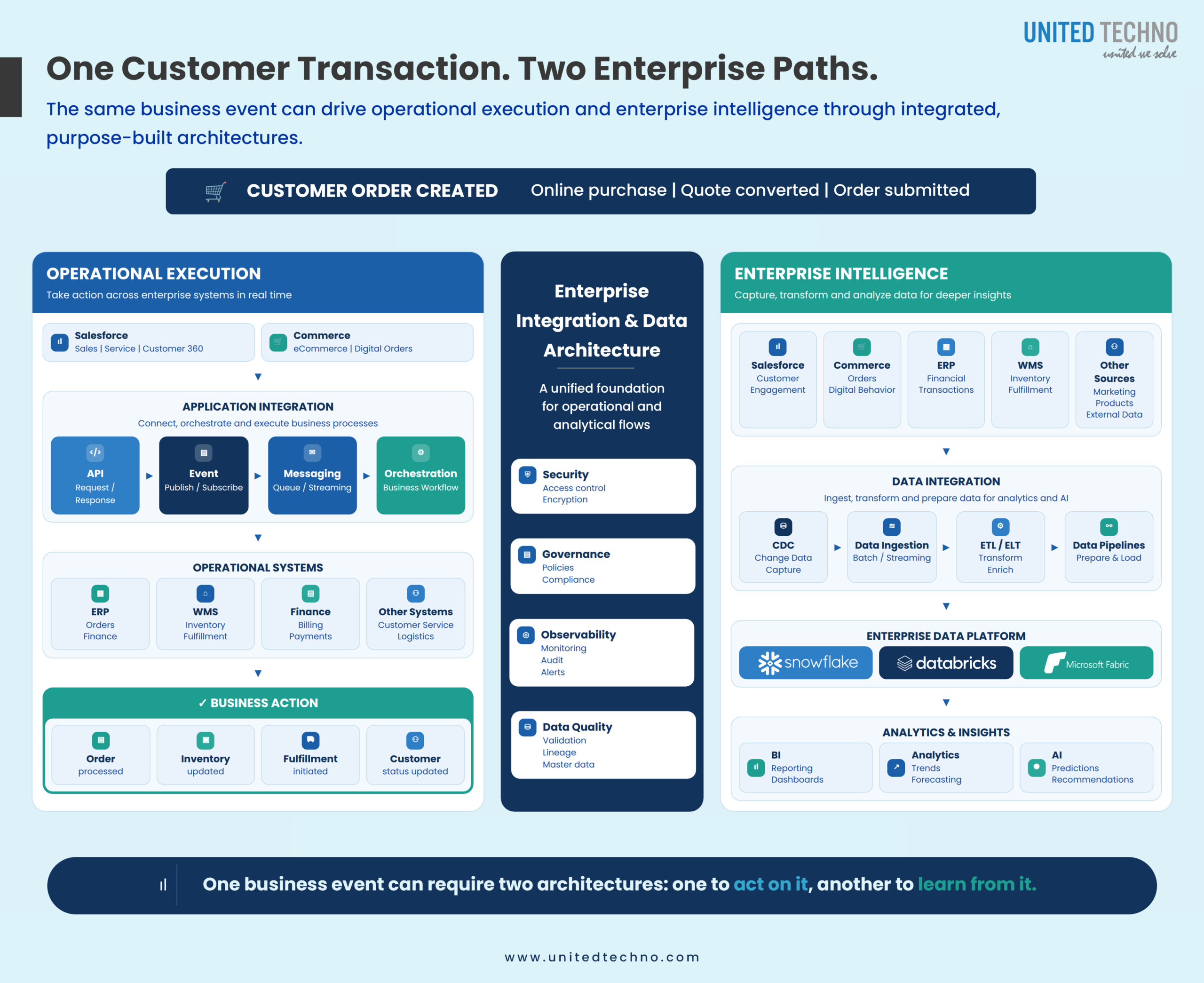
A sales representative may work in Salesforce. The customer’s financial information may reside in an ERP. The order may originate in an eCommerce platform. Inventory may be managed by a WMS. Fulfillment may happen through another operational system. Later, the same transaction may become part of an enterprise data platform used for reporting, forecasting or AI.
From the user’s perspective, this can look like one continuous process.
Technically, it is a collection of systems with different responsibilities.
That is where Salesforce integration architecture becomes important.
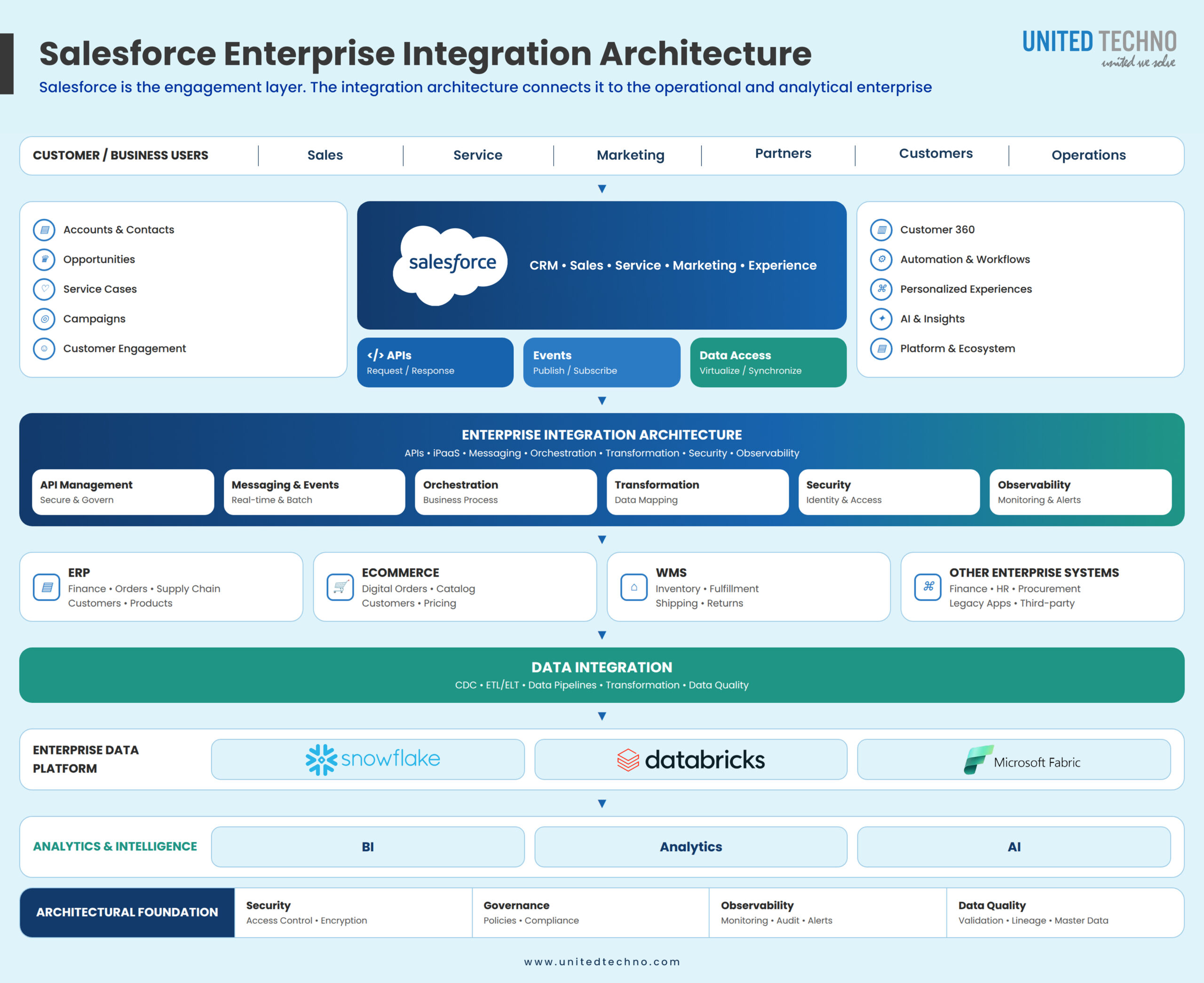
The objective is not to connect Salesforce to every application in the enterprise. The goal is to control information movement between systems while preserving ownership, business rules, operational reliability, and a usable path to enterprise data.
Salesforce Is One Part of the Enterprise Architecture
A Salesforce implementation can support sales, service, marketing, customer engagement, and other customer-facing processes.
But it does not automatically become the system of record for everything associated with a customer.
An enterprise may have a landscape such as:
Salesforce
Customer engagement and CRM
ERP
Financial and commercial transactions
eCommerce
Digital orders and customer purchases
WMS
Inventory and fulfillment
Integration layer
Connectivity, orchestration and process coordination
Data platform
Enterprise reporting, analytics and AI
The architecture works when these responsibilities are clear.
It becomes difficult when every system begins storing and modifying the same information without a defined ownership model.
The First Architecture Decision: Who Owns What?
Before designing an integration, identify the authoritative source for each major business object.
For example:
| Business information | Potential owner |
| Customer engagement | Salesforce |
| Opportunity | Salesforce |
| Financial transaction | ERP |
| Inventory position | ERP / WMS |
| Order fulfillment | WMS / logistics platform |
| Digital order | eCommerce / ERP |
| Enterprise historical data | Data platform |
These are not universal rules. Every enterprise has its own operating model.
The important principle is ownership before synchronization.
If Salesforce and the ERP both become authoritative for the same customer attribute, the integration layer eventually has to determine which value is correct.
That creates unnecessary reconciliation.
A better architecture defines ownership first and then determines what other systems actually need.
The Integration Layer Should Have a Job
An integration layer should not become a dumping ground for every transformation, business rule and data movement requirement.
Its role is to coordinate interactions between systems.
Depending on the workload, that can involve:
- APIs
- Events
- Messaging
- Workflow orchestration
- Data transformation
- Error handling
- Security
- Monitoring
- Retry and recovery
- Transaction coordination
The architecture should select these capabilities based on the interaction.
A customer-facing transaction may need an immediate response.
A business event may need to reach several systems independently.
A large historical dataset may belong in a data pipeline rather than an operational integration.
These are different problems even when Salesforce is involved in all three.
When Salesforce Needs an Immediate Response
Consider a sales process.
An opportunity reaches a stage that requires action in another enterprise system.
The integration may need to:
- capture the Salesforce change,
- validate the required information,
- invoke the appropriate downstream service,
- process the response,
- update Salesforce with the resulting status.
This is an operational integration.
The important requirement is not simply moving fields from Salesforce to another application.
The requirement is completing a business action across system boundaries.
That means the architecture needs to consider:
- response time
- transaction sequencing
- validation
- authentication
- failure handling
- duplicate prevention
- retry behavior
- status management
The API is only one part of that design.
When an Event Is More Appropriate
Not every interaction needs Salesforce to wait for another application.
Sometimes the important information is simply:
Something changed.
- A customer was created.
- An order was submitted.
- An account changed status.
- A case was escalated.
- An opportunity progressed.
In these situations, an event can allow downstream systems to respond independently.
For example:
Salesforce
Customer status changed
↓
Business Event
↓
ERP | Service | Marketing | Data Platform
Each consumer can determine what that change means for its own responsibility.
This approach can reduce direct dependencies between systems and becomes increasingly useful when several applications need to react to the same business activity.
The architectural value is not that events are automatically better than APIs.
It is that the interaction model matches the business requirement.
Salesforce and ERP: Keep the Transaction Moving
The Salesforce-ERP relationship is one of the most common places where integration architecture becomes critical.
Sales teams may need customer and opportunity information in Salesforce.
Finance needs orders, invoices and payments in the ERP.
Operations may need fulfillment information from another system.
A typical business flow could look like:
Salesforce
Customer → Opportunity → Commercial decision
↓
Integration Architecture
Validation → Transformation → Routing → Orchestration
↓
ERP
Order → Billing → Financial processing
↓
Operations
Inventory → Fulfillment → Delivery
The integration should not turn these systems into interchangeable databases.
Each should continue performing the work it is designed to perform.
Salesforce can remain focused on customer and commercial engagement while the ERP maintains financial and transactional responsibilities.
The integration layer connects the process.
Add eCommerce and the Architecture Changes Again
Now introduce Shopify or another commerce platform.
A customer places an order online.
The order may need to reach:
- the ERP for financial processing
- the WMS for fulfillment
- Salesforce for customer-service visibility
- a marketing platform for subsequent engagement
- the enterprise data platform for analytics
One customer action now creates several downstream requirements.
That is why point-to-point integration becomes difficult to manage as enterprises grow.
Adding one more application should not require redesigning every existing connection.
The architecture needs reusable interfaces, controlled routing and clearly defined responsibilities.
Salesforce Data Has Another Destination: Enterprise Intelligence
Operational integration is only half of the story.
Salesforce generates valuable information about:
- customers
- opportunities
- interactions
- service activity
- campaigns
- products
- commercial activity
But meaningful enterprise analysis often requires that information to be combined with data from other systems.
For example:
Salesforce
Customer + engagement
ERP
Revenue + financial transactions
eCommerce
Orders + digital behavior
WMS
Inventory + fulfillment
Together, these sources can create a much richer analytical picture than any one system can provide independently.
This is where the architecture changes from application integration to data integration.
Operational Data and Analytical Data Have Different Jobs
The same customer transaction can serve two completely different purposes.
Operational purpose
A sales representative needs to know:
What is happening with this customer right now?
Analytical purpose
An executive may need to know:
How has customer behavior changed across regions, products and channels over the past three years?
The first requirement belongs to operational systems.
The second requires a data architecture capable of collecting, transforming, governing and analyzing information at enterprise scale.
A common pattern is:
Salesforce + ERP + eCommerce + WMS + Other Sources
↓
CDC / Data Ingestion / ETL / ELT
↓
Snowflake / Databricks / Microsoft Fabric
↓
BI | Analytics | AI
The data platform therefore complements Salesforce rather than replacing it.
The Architecture Needs a Clear Boundary Between Integration and Data Engineering
This boundary is frequently blurred.
Application integration is concerned with questions such as:
- Should this customer be created?
- Should this order be submitted?
- Should this case trigger another process?
- Should this status change be communicated?
- Data engineering asks different questions:
- How do we combine customer, order and financial data?
- How do we preserve historical information?
- How do we reconcile conflicting records?
- How do we make the dataset analytics-ready?
- How do we govern and monitor the pipeline?
Both disciplines move data.
Their purposes are different.
That distinction should influence the architecture from the beginning.
What Happens Without an Architecture?
The first Salesforce integration may be straightforward.
Then another requirement arrives.
Then another.
Soon there may be:
Salesforce → ERP
Salesforce → eCommerce
ERP → Salesforce
WMS → Salesforce
Salesforce → Marketing
Salesforce → Data Platform
ERP → Data Platform
Each connection may work individually.
The problem is the landscape.
When responsibilities are not standardized, teams eventually face:
- duplicated transformations
- inconsistent customer definitions
- undocumented dependencies
- different authentication approaches
- fragmented monitoring
- difficult troubleshooting
- repeated integrations
- unclear ownership
- increasing maintenance effort
The integration architecture should therefore be designed for the next connection, not only the first one.
Four Layers That Keep the Architecture Manageable
A practical Salesforce enterprise architecture can be viewed through four responsibilities.
1. Connectivity
APIs | Events | Messaging | Connectors
How does information move?
2. Process Coordination
Orchestration | Business Rules | Transformation
What needs to happen when multiple systems participate in one process?
3. Operational Synchronization
Customers | Accounts | Orders | Status | Transactions
Which information needs to remain aligned between operational systems?
4. Enterprise Data
CDC | ETL/ELT | Pipelines | Data Quality | Governance
How does operational information become a reliable enterprise data asset?
This four-layer view prevents a common mistake: treating every Salesforce integration as the same type of workload.
The Problems That Matter at Scale
Enterprise Salesforce integration is rarely difficult because an API cannot be connected.
The harder problems appear later.
Data ownership
Two systems begin changing the same record.
Volume
A process that works for hundreds of records behaves differently when thousands or millions are involved.
Platform constraints
Salesforce workloads need to account for platform transaction and API limits when integration patterns are selected.
Failure recovery
A downstream application becomes unavailable halfway through a business process.
What happens to the transaction?
Reconciliation
The transaction succeeds in one system but fails in another.
How is the difference identified and corrected?
Observability
Operations teams need visibility into failed messages, processing status and downstream impact.
Security
Integration accounts and data access must be controlled across every connection.
Change management
A new field, changed business rule or redesigned application should not unexpectedly break downstream systems.
These are architecture concerns, not connector concerns.
Where United Techno Fits
Salesforce integration requires more than Salesforce expertise when the environment includes ERP, commerce, legacy applications, data platforms and multiple integration technologies.
United Techno’s Salesforce practice brings 60+ Salesforce certifications, 80+ Salesforce customers and 120+ Salesforce SMEs, with 95% of projects delivered within budget and timeline.
Its Salesforce capabilities span implementation, data management, integration, Sales Cloud, Service Cloud, Marketing Cloud, Experience Cloud, Health Cloud, Financial Services Cloud, Lightning migration and managed services.
The broader integration practice extends across Boomi, MuleSoft, Workato and other enterprise integration technologies, with 750+ integration projects and substantial experience across application connectivity, B2B/EDI, managed integration services and integration operations.
That combination matters because Salesforce Integration Architecture rarely ends at Salesforce.
The CRM may be the starting point.
The enterprise architecture is the real environment in which it operates.
Design Salesforce Integration Around the Business, Not the Connector
A scalable Salesforce integration strategy should be able to answer five questions before implementation begins:
- Who owns the information?
- What business action needs to occur?
- Which systems need to know about the change?
- Does the interaction belong to application integration or data integration?
- How will the architecture behave when volume, applications and business requirements increase?
The answers determine whether the right pattern is an API, event, orchestration workflow, synchronization mechanism, data pipeline or a combination of several approaches.
The objective is not to create more integration.
It is to create better boundaries between systems.
Salesforce Should Connect the Enterprise Without Becoming the Enterprise
Salesforce can serve as the operational center for customer engagement without becoming the owner of every customer-related transaction.
ERP systems can continue managing financial processes.
Commerce platforms can manage digital transactions.
WMS platforms can manage fulfillment.
Data platforms can bring information together for enterprise intelligence.
The Salesforce Integration Architecture provides the controlled movement between them.
That is the difference between simply connecting Salesforce and architecting Salesforce within the enterprise.
When system ownership is clear, integration patterns match the workload, operational processes remain reliable, and enterprise data has a deliberate path into analytics and AI.
United Techno helps enterprises design and implement Salesforce integration architectures that connect CRM, ERP, commerce, operations and modern data platforms without losing sight of the business processes those systems support.
Build the Salesforce integration architecture around the enterprise, not around the next connector.