Application Integration vs Data Integration: The Real Question Is Where the Work Belongs
Enterprise technology rarely suffers from a shortage of systems.
Salesforce manages customer relationships. ERP platforms manage financial and operational transactions. Commerce platforms manage orders. WMS platforms manage fulfillment. Data platforms bring information together for analytics, reporting, and AI.
The problem begins when these systems need to work together.
A new customer may need to move from CRM into an ERP. An order may need to trigger fulfillment. A completed transaction may need to reach finance. At the same time, millions of records from those same systems may need to flow into Snowflake, Databricks or Microsoft Fabric for analytics.
Both scenarios involve data moving between systems.
They are not the same integration problem. Understanding Application Integration vs Data Integration starts with recognizing that these two scenarios serve different business purposes.
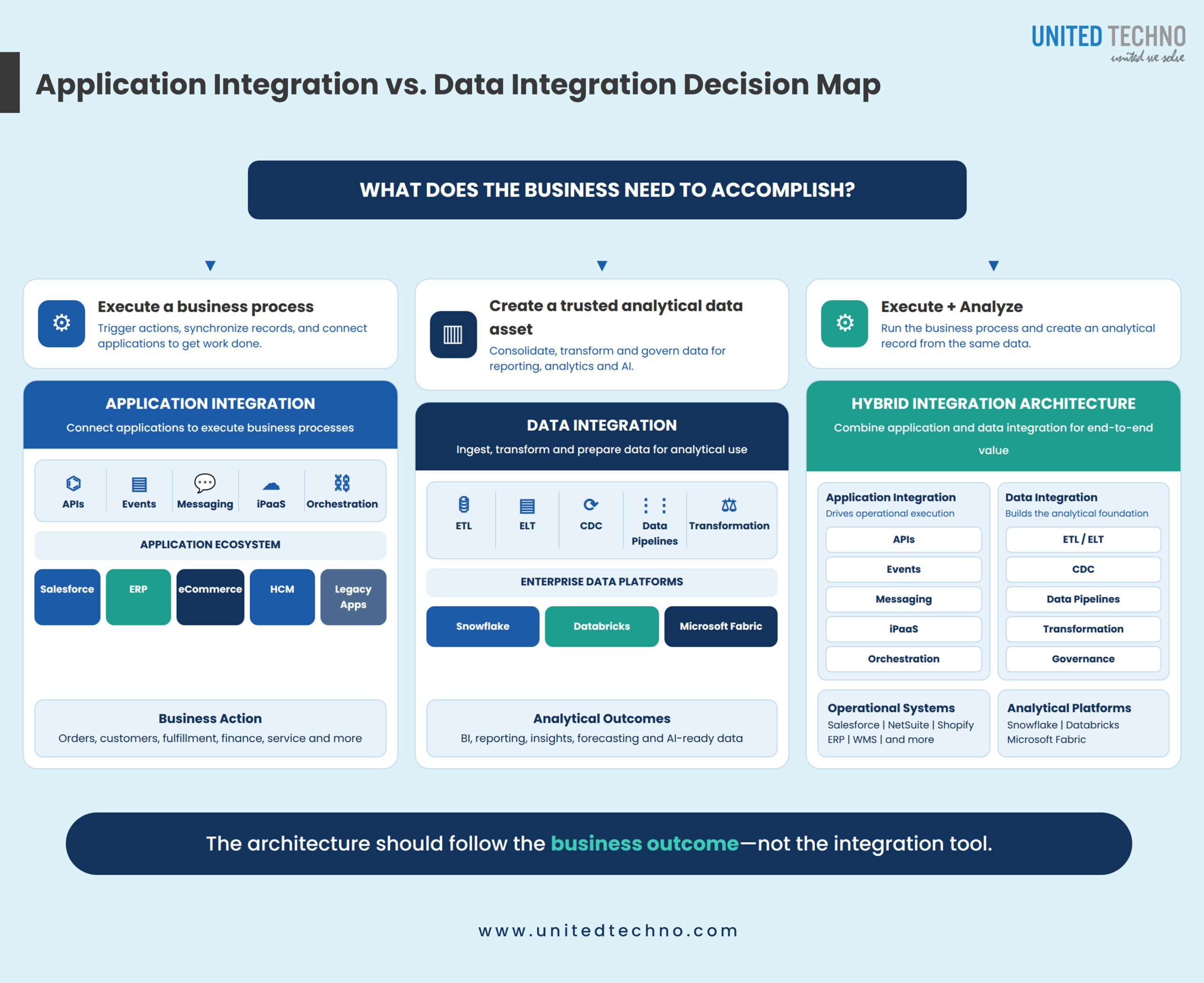
Application integration is primarily about coordinating business actions across systems. Data integration is primarily about making data from multiple sources usable, consistent and available for analysis or downstream consumption.
The distinction matters because choosing the wrong architecture can create unnecessary complexity, poor performance, duplicated logic and difficult-to-maintain integrations.
The better question is not:
“Should the enterprise use application integration or data integration?”
It is:
“What does the business need the data movement to accomplish?”
Application Integration Is About Making Systems Work Together
Application integration connects business applications so that one system can trigger, update or participate in a process managed across multiple systems.
Consider a retail order.
A customer places an order in Shopify.
That event may need to:
- create or update a customer in an ERP
- create a sales order
- validate inventory
- initiate fulfillment
- communicate with a warehouse or 3PL
- update the customer
- trigger invoicing
- send payment information to finance
The objective is not simply to copy the Shopify order somewhere else.
The objective is to move the business process forward.
That distinction is fundamental.
Typical application-integration patterns include:
- API-based integration
- Event-driven integration
- Webhooks
- Messaging
- Real-time synchronization
- Workflow orchestration
- iPaaS
- EDI
- Legacy application integration
- Cross-system transaction processing
Application integration therefore needs to understand more than fields and records.
It needs to understand business rules, sequencing, dependencies, exceptions and ownership.
A Salesforce Example: Integration Is Part of the Business Process
When evaluating Application Integration vs Data Integration, United Techno’s Salesforce work provides a practical example of how application integration supports business processes.
In one online auction and asset-liquidation engagement, Salesforce Sales Cloud was integrated with Marketing Cloud, calendar and email capabilities, DocuSign and appointment scheduling. The implementation automated auction milestones, contract workflows, customer communication and executive reporting.
The result was not simply a synchronized Salesforce database.
The integration supported the auction operating process.
Reported outcomes included a 40% reduction in scheduling delays and follow-ups, 35% higher lead email engagement and a 25% faster decision-making cycle.
That is application integration in its broader sense: connecting applications to make a business process execute more effectively.
In another retail Salesforce engagement, Partner API integration connected Salesforce with back-office systems for orders, inventory and customer records, while Salesforce Flow, email, telephony, web-to-lead and chatbot capabilities extended the operational workflow.
The architecture was designed around the work the business needed to perform, not around moving data for its own sake.
Data Integration Has a Different Objective
Data integration starts from a different question when comparing Application Integration vs Data Integration:
How can information from multiple sources be collected, transformed, governed and made usable as a reliable data asset?
Suppose an enterprise has:
- Salesforce
- NetSuite
- Shopify
- WMS
- legacy applications
- databases
- spreadsheets
- external data sources
The organization may want to bring information from all of them into Snowflake, Databricks or Microsoft Fabric.
The objective isn’t necessarily to trigger a transaction in another application.
It may be to create:
- enterprise reporting
- customer analytics
- financial analytics
- operational dashboards
- forecasting
- data science
- AI-ready datasets
- a governed enterprise data foundation
The architecture therefore emphasizes ingestion, transformation, quality, lineage, scalability and analytical usability.
Common data-integration patterns include:
- ETL
- ELT
- Change Data Capture
- Batch ingestion
- Incremental loads
- Streaming
- Data replication
- Data transformation
- Data quality
- Data reconciliation
- Data pipelines
- Data warehouse/lakehouse integration
The destination may be a data warehouse, lakehouse or analytical platform rather than another operational application.
The Difference Is Business Intent, Not Simply Real-Time vs. Batch
A common shortcut is:
Application integration = real time
Data integration = batch
That distinction is no longer sufficient.
Modern data platforms can support streaming and near-real-time ingestion. Application integrations can also use scheduled or asynchronous processing.
The more durable distinction is what the integration is trying to accomplish.
| Requirement | Application Integration | Data Integration |
| Trigger an action in another application | ✓ | |
| Coordinate a business workflow | ✓ | |
| Synchronize operational records | ✓ | |
| Process an order or transaction | ✓ | |
| Connect CRM and ERP processes | ✓ | |
| Consolidate data from multiple sources | ✓ | |
| Build an analytical dataset | ✓ | |
| Populate a data warehouse/lakehouse | ✓ | |
| Support enterprise reporting | ✓ | |
| Prepare governed data for AI | ✓ | |
| Create both operational action and analytical context | ✓ | ✓ |
The important point is that latency is only one architectural variable.
Volume, purpose, ownership, transformation complexity, failure handling and downstream use matter just as much.
Where Application Integration and Data Integration Meet
This is where enterprise architecture becomes more interesting.
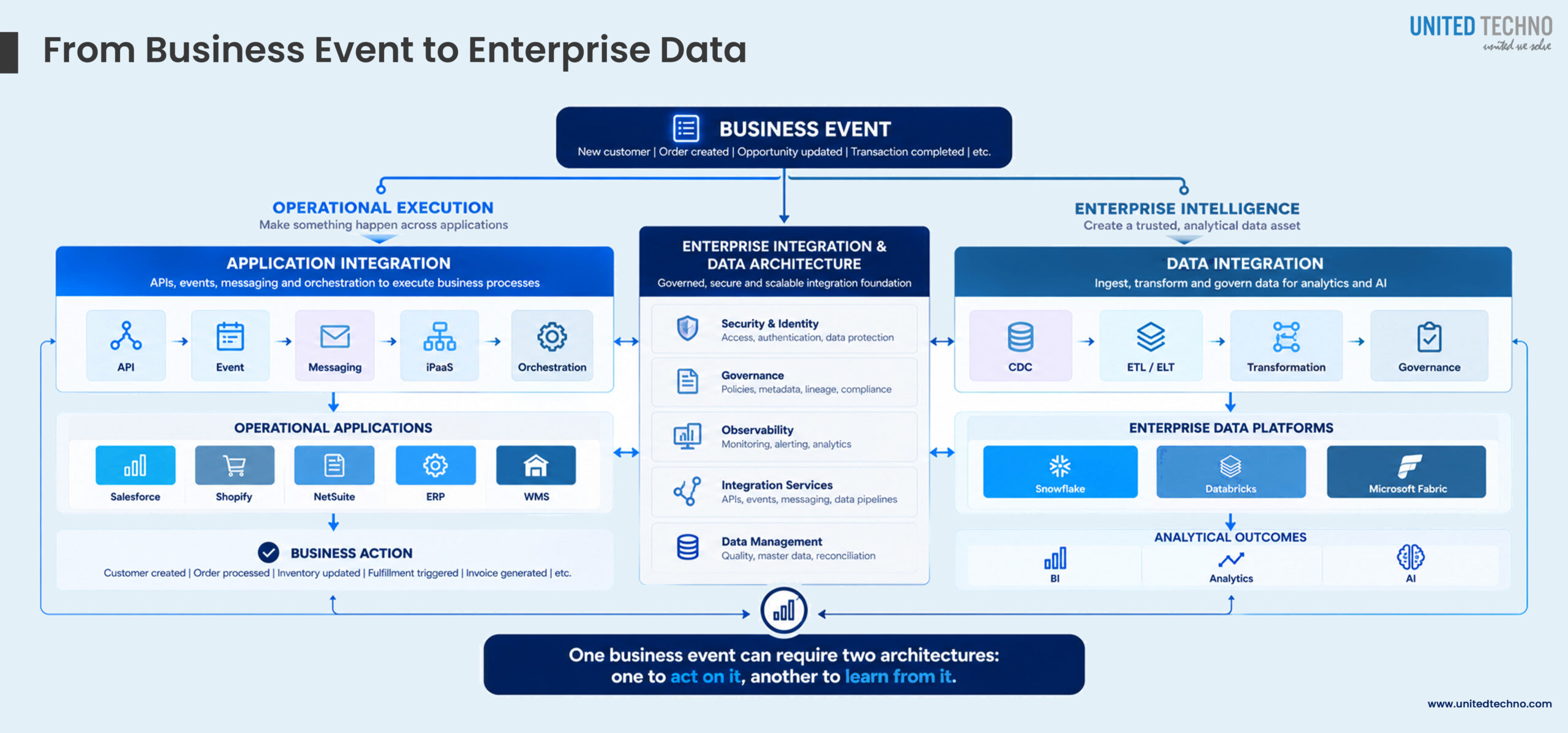
A business transaction can have two destinations.
Consider an order.
Operational path
Shopify → Integration Layer → NetSuite → WMS → Fulfillment
The integration is responsible for moving the order through the operational process.
Analytical path
Shopify + NetSuite + WMS + Salesforce → Data Pipelines → Snowflake
The data architecture creates a consolidated view for analytics.
Both paths originate from the same business activity.
But they have different objectives.
The operational path needs:
- transaction integrity
- sequencing
- business rules
- error handling
- retries
- idempotency
- authorization
- operational monitoring
The analytical path needs:
- scalable ingestion
- transformation
- data quality
- historical preservation
- lineage
- reconciliation
- governance
- analytical performance
Trying to make one architecture perform both jobs indiscriminately can create unnecessary coupling.
The Hybrid Architecture Is Often the Right Answer
Modern enterprises should not think in terms of one giant integration layer doing everything.
A more practical architecture separates responsibilities while allowing the layers to work together.
Operational layer
Salesforce | Shopify | NetSuite | ERP | WMS | Legacy
↓
Application integration
APIs | Events | Messaging | iPaaS | Orchestration
↓
Business action
At the same time:
Data integration
Operational systems
↓
Ingestion | CDC | ETL/ELT | Transformation
↓
Snowflake | Databricks | Microsoft Fabric
↓
Analytics | BI | AI
This separation allows each architecture to be optimized for the work it actually performs.
What Happens When the Wrong Pattern Is Chosen?
The consequences are usually architectural rather than immediately visible.
Using application integration for large-scale analytical movement
An integration platform may become responsible for:
- massive historical loads
- complex transformations
- analytical joins
- repeated extraction
- warehouse-oriented processing
That can create unnecessary processing overhead and operational complexity.
Using data integration for operational workflows
A warehouse-oriented pipeline may not provide what a transaction needs:
- immediate response
- business-rule execution
- transactional sequencing
- retries
- application-level error handling
- process orchestration
The data may eventually arrive.
But the business process may already have failed.
The result –
The problem isn’t that either technology is incapable.
The problem is architectural mismatch.
Data Engineering Changes the Equation
This is particularly important as enterprises consolidate operational data into modern platforms.
United Techno’s data engineering capabilities span enterprise data platform deployments, data engineering specialists and platforms including Microsoft Fabric, alongside Snowflake and Databricks capabilities.
For Microsoft Fabric specifically, United Techno has 10+ professionals skilled across Data Factory Gen2, Synapse Data Warehouse, Lakehouse, Real-Time Analytics, Data Science and OneLake integration, with 150+ enterprise data platform deployments and 60+ certified data engineers and analytics specialists across the broader data platform practice.
That capability becomes relevant when the Application Integration vs Data Integration question shifts from:
“How do these two applications communicate?”
to:
“How do we create a reliable enterprise data foundation from everything these applications produce?”
Where DataAccel Fits
DataAccel provides another example of why application and data integration should not be treated as interchangeable disciplines.
The framework is designed for configuration-driven data migration and ingestion across Snowflake, Databricks and Microsoft Fabric, with capabilities around source onboarding, Bronze–Silver–Gold processing, orchestration, governance and monitoring.
Its purpose is not to replace an operational application integration layer.
It addresses the next problem:
How can enterprise data from multiple operational sources be brought into a governed, reusable analytical architecture?
That distinction is important.
Application integration moves the business.
Data integration builds the data foundation from which the business can understand and optimize itself.
The Integration Platform Does Not Determine the Architecture
Enterprises sometimes start with the tool:
“We already have an iPaaS.”
or:
“We already have a data platform.”
That can lead to architecture being shaped around the capabilities of an available product rather than the requirements of the workload.
United Techno’s integration practice spans platforms including Boomi, MuleSoft, Workato and Celigo, supported by enterprise integration advisory, implementation, managed services and integration operations capabilities. The broader practice reports 750+ integration projects, 50+ active customers and 25+ active managed services.
Platform experience therefore becomes an architectural capability rather than a reason to force every workload into the same pattern.
For example:
- Boomi can support application connectivity, orchestration and integration operations.
- MuleSoft can support API-led and enterprise integration architectures.
- Workato can support application workflows and automation.
- Celigo can address application and data integration scenarios.
- Snowflake, Databricks and Microsoft Fabric can provide the analytical data foundation.
- DataAccel can standardize and accelerate data ingestion and transformation across those data platforms.
The architecture determines where each capability belongs.
A Practical Decision Framework
When evaluating Application Integration vs Data Integration, ask five questions before selecting an integration pattern.
1. Is the objective to make something happen?
If yes, start with application integration.
Example:
Salesforce opportunity becomes Closed Won → create NetSuite sales order.
2. Is the objective to make information available for analysis?
If yes, start with data integration.
Example:
NetSuite transactions → Snowflake → finance analytics.
3. Does the process cross several operational systems?
If yes, evaluate application orchestration.
Example:
Shopify → ERP → WMS → payment → customer notification.
4. Does the workload involve large historical or continuously growing datasets?
If yes, evaluate data integration architecture.
Example:
Salesforce + NetSuite + Shopify → Snowflake.
5. Does the business need both immediate action and long-term intelligence?
If yes, design a hybrid architecture.
Example:
Shopify order → NetSuite fulfillment
while simultaneously:
Shopify + NetSuite + fulfillment data → Snowflake → analytics.
This is where many enterprise environments ultimately land.
United Techno’s Perspective: Integration Should Follow the Workload
There is no single integration pattern that should govern an entire enterprise.
A mature architecture recognizes that different workloads have different requirements.
United Techno’s experience spans both sides of that boundary: enterprise application integration across Boomi, MuleSoft, Workato and other integration technologies, and data engineering across modern data platforms.
The scale of that experience is reflected in 3,000+ Boomi integrations built, including a single implementation involving 1,500+ integrations, alongside 400+ MuleSoft integrations and 200+ Workato integrations.
The Salesforce practice adds another dimension, with 60+ Salesforce certifications, 80+ customers and 120+ Salesforce subject matter experts, supporting implementation, integration, data management and managed services.
That combination matters because enterprise integration rarely stays inside one category.
- A Salesforce implementation may require ERP integration.
- An ERP integration may feed a data platform.
- A data platform may support analytics and AI.
- And an AI application may eventually need to act back on the operational systems.
The architecture therefore needs to account for the complete movement from business event to operational action to governed enterprise data.
The Boundary Is Becoming More Important, Not Less
As enterprises add SaaS applications, data platforms, APIs and AI workloads, integration is becoming less about connecting two endpoints and more about designing the movement of business information across different architectural purposes.
Application integration answers:
What should happen next?
Data integration answers:
What should the enterprise know from everything that happened?
A modern enterprise needs both.
The critical architectural decision is knowing where each belongs, where they should interact, and where they should remain separate.
Build the Right Integration Architecture for the Workload
Whether the requirement is connecting Salesforce to an ERP, synchronizing Shopify and NetSuite, moving enterprise data into Snowflake, building pipelines for Microsoft Fabric or Databricks, or designing a hybrid architecture across operational and analytical systems, the starting point should be the business workload, not the connector or platform already available.
United Techno helps enterprises design, implement and operate integration architectures across applications, APIs, data platforms and business processes.
Talk to United Techno about designing an integration architecture built around how your enterprise actually works.