
Enterprise data architecture | CRM data engineering | Snowflake
Salesforce contains some of the enterprise’s most valuable operational information – accounts, contacts, opportunities, cases, activities, campaigns, and customer interactions.
Snowflake serves a different role. It provides a place to bring CRM information together with ERP, commerce, finance, product, marketing, and operational data so the enterprise can analyze the business across systems.
The difficult part of Salesforce to Snowflake is not moving records. The hard part is ensuring the information that reaches Snowflake is complete, traceable, current, secure, and aligned with the business’s definitions.
That is what a governed CRM data pipeline is designed to achieve.
1. Why Salesforce Data Needs a Governed Pipeline
A Salesforce environment rarely remains static. Custom objects accumulate, fields are added, business rules change, accounts are merged, records are deleted, and automation introduces changes that may not be obvious to downstream consumers.
The result is a common enterprise problem: the warehouse contains plenty of CRM data, but teams still debate whether the numbers can be trusted.
A governed Salesforce to Snowflake pipeline should make it possible to determine where a record came from, when it changed, how it was processed, who can access it, how fresh it is, and whether the load reconciled successfully.
Those are architecture concerns. Reporting is the final consumer of those decisions, not the place where they should be made.
2. Start With the Business Questions, Not the Salesforce Objects
The first design question should not be, “Which Salesforce objects should be loaded?” It should be, “What decisions will the Snowflake data support?”
| Business requirement | Representative data |
| Pipeline reporting | Opportunities, accounts, owners, stages, amounts |
| Customer 360 | Accounts, contacts, cases, orders, interactions |
| Sales performance | Opportunities, activities, territories, targets |
| Marketing attribution | Leads, campaigns, responses, opportunities |
| Service analytics | Cases, accounts, products, service activity |
| Enterprise revenue analysis | Salesforce + ERP + commerce + finance |
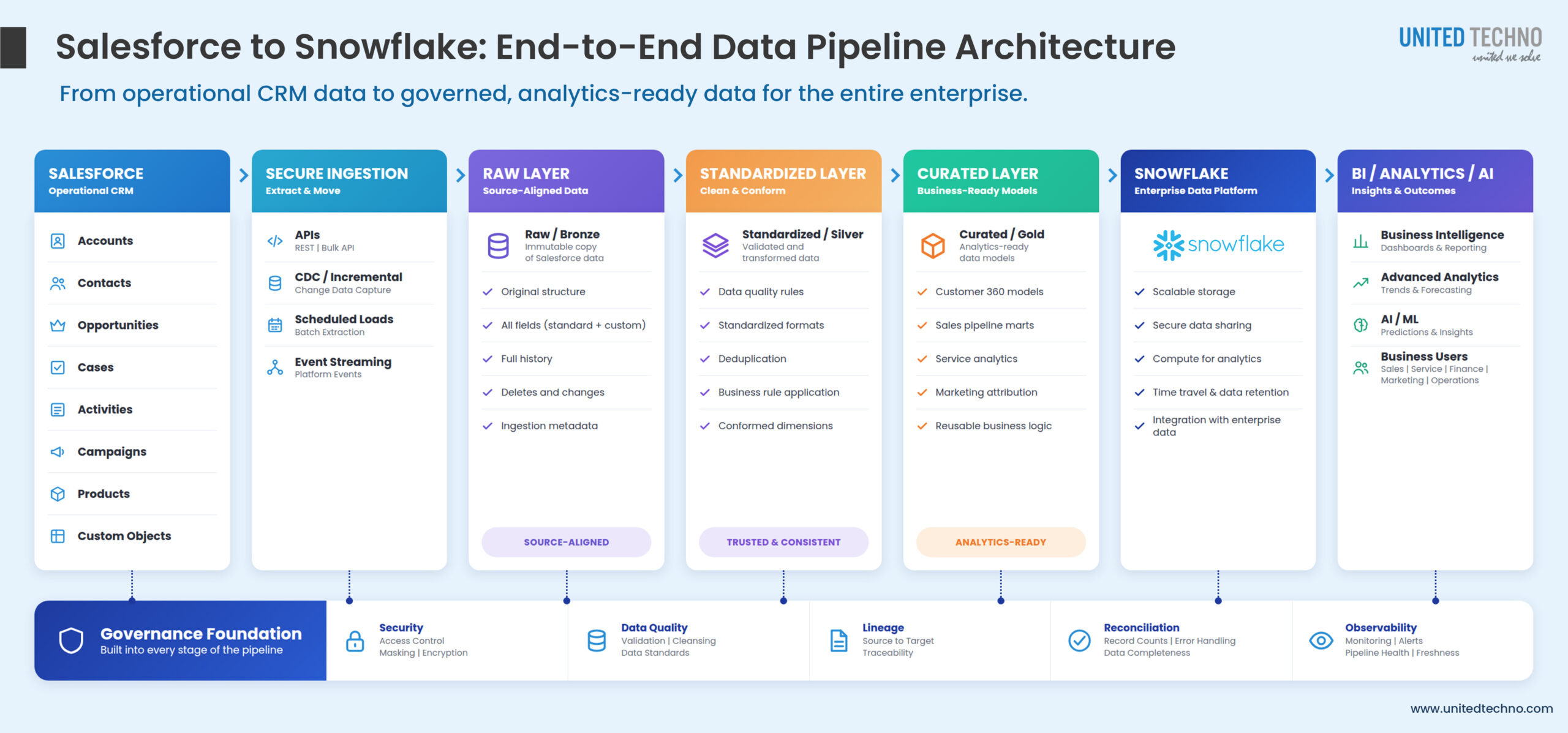
3. A Practical Salesforce-to-Snowflake Architecture
A dependable architecture separates three concerns: moving source data, preserving source history, and applying business meaning.
Salesforce is the operational source. Secure ingestion moves the required data into a controlled landing area. A raw layer preserves the source representation. Standardized models resolve structural inconsistencies. Curated models apply business definitions for analytics and downstream consumption.
The separation creates a clear boundary between what Salesforce supplied and what the data platform decided to do with it.
4. Extract CRM Data Without Disrupting Salesforce
Extraction for a Salesforce to Snowflake pipeline should be designed around data volume, required freshness, API capacity, and the business importance of the workload.
For an initial historical load, bulk extraction is generally more appropriate than repeatedly querying individual records. For ongoing synchronization, incremental extraction reduces unnecessary movement and makes processing more predictable.
A common incremental pattern maintains a watermark representing the last successfully processed point in time or sequence.
The important detail is that the watermark should advance only after the corresponding batch has been successfully processed. Otherwise, a failed transformation can cause records to fall permanently outside the next extraction window.
A small lookback window can protect against timing boundaries. The overlap is safe only when downstream processing is idempotent, meaning the same record can be processed again without creating a duplicate result.
5. Capture Changes, Not Just Initial Loads
The first load is rarely the difficult part. The real engineering work begins when Salesforce records start changing.
Records may be created, updated, deleted, undeleted, merged, reassigned, or modified by automation. The pipeline therefore needs an explicit change-handling strategy rather than treating every run as a fresh copy.
Timestamp-based extraction, replication mechanisms, and change-event patterns can all be appropriate depending on the required latency and operating model.
Deletion handling deserves particular attention. If the pipeline captures only new and updated records, a record removed from Salesforce can remain active in Snowflake indefinitely.
A practical model carries an operation state such as UPSERT, DELETE, or UNDELETE. Downstream models can then decide whether to retain history, mark a record inactive, or physically remove it.
6. Preserve the Raw Salesforce Layer
The raw layer should be a durable record of what the pipeline received from Salesforce, not a temporary table that is overwritten after every transformation.
Useful pipeline metadata can include the source object, source record ID, ingestion timestamp, source modification timestamp, load ID, batch ID, operation and record hash.
This creates a traceable path from a business metric back to its source. If a revenue figure changes in a curated model, an engineer can follow the chain from the dashboard to the business model, transformation, raw record and extraction batch.
The raw layer therefore acts as a controlled boundary between source truth and warehouse interpretation.
7. Standardize CRM Data for Analytics
Salesforce data is structured for operational use. Analytical models need consistent definitions across teams and reporting periods.
Standardization commonly covers timestamps, currencies, countries, picklists, null handling, duplicate detection, account and contact relationships, owner and territory mappings, record status and data types.
The important point is not to reproduce every Salesforce field downstream. It is to establish a consistent analytical representation that other models can reuse.
For example, one implementation may represent a closed opportunity through a single stage value while another derives reporting status from several fields. The curated model should establish one documented business definition rather than forcing every dashboard to recreate the logic.
8. Build Business-Ready Snowflake Models
The curated layer should reflect how the enterprise actually analyzes customers and revenue.
Typical models include a sales pipeline mart, a Customer 360 model, a marketing performance model and a service operations model.
Sales pipeline models bring together opportunities, accounts, owners, territories, stages, amounts and expected close dates. Customer 360 models combine customer relationships and interactions. Marketing models connect campaigns and responses to opportunities and revenue. Service models connect cases, customers, products and resolution activity.
The principle is simple: define business logic once and reuse it. If pipeline value, active customer or closed revenue is calculated differently across several dashboards, the underlying data model has not established a shared definition.
9. Put Governance Around the Data
Governance belongs inside the pipeline architecture, not in a separate document produced after implementation.
Role-based access should distinguish raw, standardized and curated data according to business responsibilities. Sensitive customer fields can be protected with masking policies, while row-level controls can restrict access by region, business unit or other approved boundaries.
Lineage should connect a business KPI to its curated model, transformation logic, source field and Salesforce object. This gives data owners and engineers a common way to investigate questions about both access and meaning.
10. Reconcile the Pipeline
A pipeline can finish without an error and still produce an incomplete result. Reconciliation is therefore a processing step, not an optional report.
Useful controls compare source and target record counts, key coverage, important numeric totals, expected change volumes, deletion counts, duplicate keys, and batch completion states.
For example, a reconciliation record might show that 125,420 Salesforce records were extracted, 125,420 reached the raw layer, 12 were rejected by validation, and 125,408 reached the curated model.
The objective is to explain what happened to the data, not simply report that a job completed.
| Check | Example |
| Record count | Salesforce extract vs. Snowflake landing |
| Key coverage | Source IDs missing downstream |
| Amount totals | Salesforce opportunity amount vs. landed amount |
| Change volume | Expected vs. processed changes |
| Deletes | Salesforce deletions vs. operation records |
| Duplicate keys | Multiple current records for one Salesforce ID |
| Batch status | Extracted, loaded, transformed and published |
11. Monitor Freshness, Quality and Schema Changes
Operational monitoring for a Salesforce to Snowflake pipeline should cover more than job success and failure.
Freshness needs an explicit service target tied to the business process. A sales dashboard reviewed each morning may require a different target from an operational workflow that depends on current customer events.
Data quality monitoring can check unexpected nulls, invalid dates, duplicate source IDs, broken relationships, unexpected status values and abnormal record volumes.
Schema drift also requires attention. Salesforce administrators can introduce new fields or modify structures. A controlled process should detect changes, assess downstream impact, test affected models and then promote the change.
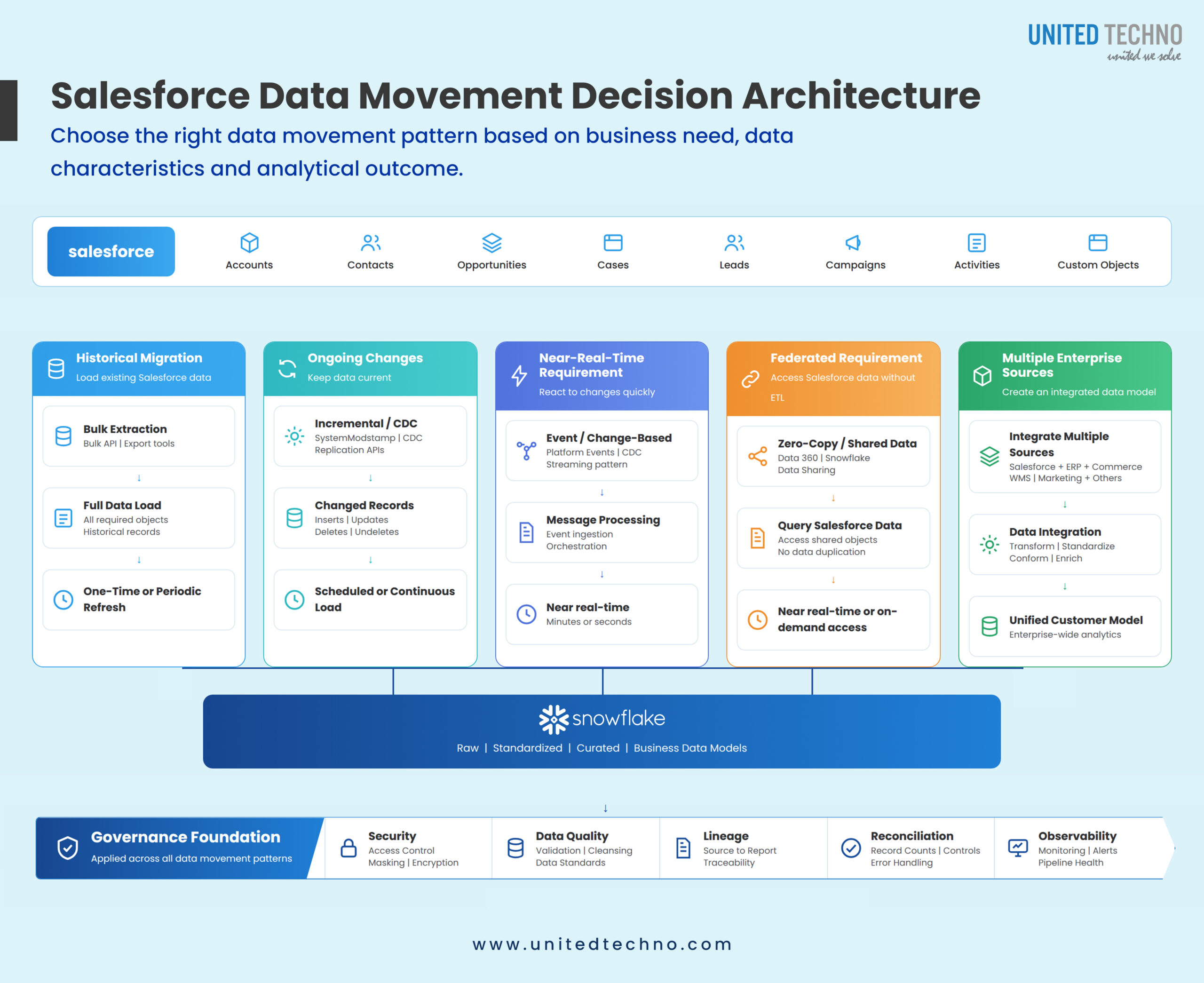
12. Choose Batch, Incremental or Near-Real-Time Processing
Not every CRM use case needs real-time data. Processing frequency should follow decision latency.
Historical migration is suited to bulk extraction. Daily reporting may use scheduled batch processing. Operational sales analytics may need incremental synchronization. Near-real-time downstream actions may require event- or change-based patterns.
The architectural question is not, ‘Can this be real time?’ It is, ‘What business decision becomes possible if the data is fresher?’
| Requirement | Pattern |
| Historical migration | Bulk extraction |
| Daily reporting | Scheduled batch |
| Operational sales analytics | Incremental extraction |
| Frequent CRM updates | Incremental / CDC |
| Near-real-time downstream action | Event / change-based |
| Federated access | Zero-copy / shared data |
| Multiple enterprise sources | Integrated Snowflake model |
13. When Zero-Copy Changes the Architecture
Salesforce to Snowflake now supports zero-copy patterns through Salesforce Data 360 and Snowflake. In supported configurations, shared Salesforce data products can be queried from Snowflake without a conventional ETL copy or duplicated storage.
That introduces another design choice. Instead of assuming that every Salesforce dataset must be replicated, architects can determine which information should be copied and modeled, which should remain shared, and where a hybrid approach is appropriate.
Zero-copy can be useful for governed access to live or shared Salesforce data. Conventional pipelines remain relevant when the enterprise needs persistent historical snapshots, extensive transformations, cross-source conformance, independent retention requirements, or specialized analytical models.
Zero-copy changes the movement pattern. It does not remove the need to define ownership, security, freshness, lineage, business meaning, and operational controls.
14. What a Reliable Salesforce-to-Snowflake Pipeline Delivers
A well-designed pipeline gives the enterprise more than a second copy of CRM records.
It creates a controlled foundation for sales and revenue reporting, Customer 360 analysis, Salesforce-plus-ERP models, marketing attribution, service analytics, historical analysis and governed analytical workloads.
More importantly, it separates source data, transformation logic and business interpretation. That separation makes the environment easier to operate as Salesforce and the surrounding enterprise landscape continue to evolve.
15. Build CRM Data That Teams Can Trust
Salesforce-to-Snowflake integration is not primarily a connection problem. The connection is only the starting point.
The difficult architecture decisions sit between the systems: how changes are captured, how deletions are represented, how raw data is preserved, how business definitions are standardized, how access is controlled, how results are reconciled, and how freshness and lineage are measured.
Organizations that treat those decisions as part of the data architecture can turn Salesforce information into a dependable enterprise data asset rather than another isolated reporting source.
United Techno helps enterprises design and implement governed Salesforce data architectures across CRM, enterprise integration, and cloud data platforms, from Salesforce data extraction and integration through Snowflake modeling, governance, monitoring, and managed support.
Talk to Our Salesforce Experts