
A database architect’s approach to finding the real cause of performance problems before changing SQL, indexes, or infrastructure
When a Database Gets Slow, the Query Is Not Always the Problem
A production database rarely becomes a performance problem overnight.
Usually, something changes first.
Data volume increases.
A new application starts using the database.
Transaction concurrency rises.
A report begins running during peak business hours.
An integration starts sending larger batches.
A query that was acceptable six months ago suddenly becomes expensive.
Then the symptoms appear:
slower screens → longer transactions → API timeouts → retries → more database load → even slower response
The natural reaction is to start Database Performance Tuning by optimizing the query.
Sometimes that works.
But after years of working with enterprise databases, I have found that the more important question is:
What changed in the workload that made the database unable to respond the way it used to?
That question leads to the root cause much faster.
Performance Is a System Behavior
A database does not operate in isolation.
A customer placing an order might trigger:
Web Application → API → Service → Database → Inventory Update → Payment → Response
If the database is spending too much time waiting for I/O, locking a heavily used table, processing inefficient joins, or handling unnecessary requests, the customer experiences the entire chain as slow.
That is why Database Performance Tuning should be viewed across four dimensions:
Workload
What is the database actually being asked to do?
Data
How much information is being processed, and how is it distributed?
Execution
How is the database choosing to perform the work?
Capacity
Does the underlying platform have enough resources for the workload?
A performance problem can sit in any one of these layers.
The First Question: What Is Consuming the Database?
I would never begin a Database Performance Tuning engagement by creating indexes.
First, establish the performance signal.
Look at:
- Queries consuming the most total database time
- Queries executing at unusually high frequency
- CPU-intensive operations
- Excessive reads and writes
- Locking and blocking
- Memory pressure
- Long-running transactions
- Connection saturation
- Sudden execution-plan changes
- Workloads competing for the same resources
This changes the investigation from:
“Which query is slow?”
to:
“Which activity is creating the greatest impact?”
Those are not the same question.
A query taking three seconds and running ten times a day may be irrelevant.
A query taking 80 milliseconds and executing hundreds of thousands of times may be a major capacity problem.
Read the Database’s Behavior, Not Just the SQL
Two SQL statements can return the same result while placing very different demands on the database.
One may use an efficient access path.
Another may scan a large table, sort intermediate results, perform expensive joins and repeatedly access the same data.
The SQL text alone does not reveal the entire story.
That is why execution plans matter in Database Performance Tuning.
They help answer questions such as:
- Where is the database spending work?
- Which operation is producing the largest intermediate result?
- Is the optimizer choosing an inefficient access path?
- Are joins occurring at the right stage?
- Is data being read unnecessarily?
- Has the execution strategy changed as the data grew?
The objective is not to make the SQL look cleaner.
It is to reduce unnecessary work performed by the database engine.
An Index Should Solve a Measured Problem
Indexing is powerful because it changes how data can be accessed.
It is also easy to overuse.
A new index can improve one read-heavy workload while increasing the amount of work required for inserts and updates.
It can consume storage.
It can become redundant.
And an index created for yesterday’s application behavior may have little value after the application changes.
In Database Performance Tuning, instead of asking:
“Which columns should we index?”
I prefer asking:
“Which access patterns are expensive enough to justify another access structure?”
That produces a much better indexing strategy.
Observe → Hypothesize → Test → Measure
An index should be treated as an engineering decision, not a default performance remedy.
Data Growth Eventually Exposes Architecture
One of the most common enterprise patterns is this:
A system performs well at 10 million records.
Then it reaches 100 million.
The application has barely changed.
Yet response times deteriorate.
The problem is often that the original architecture was designed around a smaller data shape.
At that point, Database Performance Tuning may still help—but query optimization alone may no longer be enough.
The conversation may need to move toward:
- Partitioning
- Data lifecycle management
- Archiving
- Read/write separation
- Replication
- Caching
- Precomputed results
- Workload isolation
- Storage redesign
- Horizontal scaling
This is where database performance becomes database architecture.
The question changes from:
“How do we make this query faster?”
to:
“Should this workload still be handled this way?”
The Application Can Quietly Create Database Problems
Some of the most expensive database issues originate outside the database.
Consider an API that retrieves a list of 500 customers and then performs another database query for each customer.
The database may be perfectly capable of executing each individual query.
The application has nevertheless created hundreds of unnecessary round trips.
Other examples include:
Connection churn
Opening and closing connections unnecessarily.
Oversized transactions
Holding resources longer than the business operation requires.
Repeated reads
Requesting the same information multiple times.
Poor pagination
Forcing the database to process increasingly large result sets.
Chatty integrations
Breaking one logical operation into excessive database calls.
Inefficient ORM behavior
Generating SQL that does not reflect the application’s actual access requirements.
This is why effective Database Performance Tuning must cross the application/database boundary rather than focusing exclusively on the database engine.
The Hidden Performance Killer: Concurrency
A database can handle a query efficiently in isolation and still struggle when hundreds of users execute it simultaneously.
That is the difference between query performance and workload performance.
Imagine:
1 user → 100 ms
Now imagine:
500 concurrent users → contention → queues → locks → resource saturation → rising latency
The query did not necessarily become worse.
The workload changed.
That is why Database Performance Tuning should include realistic performance testing under:
- concurrency
- transaction volumes
- data sizes
- read/write ratios
- peak-hour behavior
- integration traffic
- background processing
A database that performs well in a developer environment may behave very differently under production concurrency.
Tune for the Business Transaction
Database metrics are useful.
Business metrics are better.
In Database Performance Tuning, the real measure of success is how effectively the database supports the business operation it serves.
A retailer may care about:
Order completion time
A logistics company may care about:
Shipment update latency
A financial platform may care about:
Transaction processing time
A healthcare application may care about:
Patient-record response time
The database should ultimately be measured against the business operation it supports.
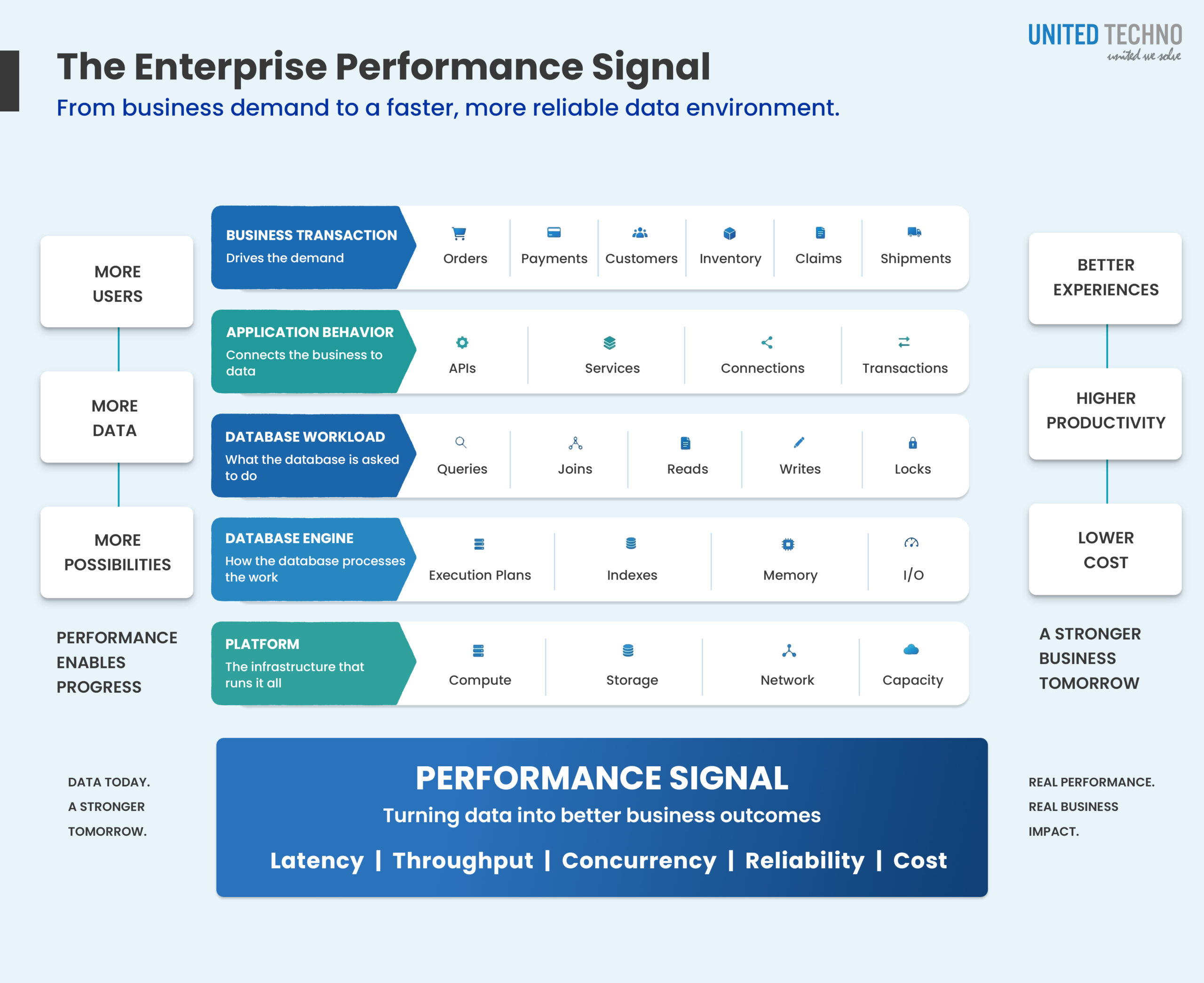
That creates a useful chain:
Business Transaction
↓
Application Request
↓
Database Workload
↓
Resource Consumption
↓
User Outcome
If the user experience improves but database CPU increases dramatically, the optimization may have simply moved the problem.
If query latency decreases while transaction throughput remains constrained, the bottleneck may be elsewhere.
Performance tuning is successful only when the entire transaction improves.
Performance Has a Cost Dimension Now
Enterprise database performance is increasingly connected to infrastructure economics.
An inefficient workload may consume more:
CPU → memory → I/O → storage → cloud capacity
That means performance teams should ask two questions together:
How fast is this workload?
and
How much infrastructure does it require to remain fast?
A query that becomes 30% faster while consuming twice as much compute may not represent a meaningful architectural improvement.
The better outcome is:
Lower work + predictable latency + sustainable capacity
A Practical Performance Tuning Sequence
For an enterprise database, I would use a disciplined sequence rather than a checklist of isolated fixes.
01 — Establish
Capture the normal performance baseline.
02 — Trace
Follow the slow business transaction through the application and database.
03 — Isolate
Identify the dominant source of work, waiting or contention.
04 — Explain
Determine why the database is behaving that way.
05 — Change
Modify the smallest layer capable of addressing the root cause.
06 — Stress
Test the change under realistic volume and concurrency.
07 — Observe
Continue monitoring after deployment.
This prevents a common mistake:
optimizing the visible symptom while leaving the underlying constraint untouched.
The Enterprise Performance Signal
Modern Database Tuning Is Becoming More Continuous
The old model was reactive:
Users complain → DBA investigates → fix → close ticket
The better model is continuous:
Observe → Detect → Investigate → Optimize → Validate → Monitor
This is particularly important in cloud environments, where workloads can change quickly and infrastructure can scale without solving the underlying inefficiency.
Automation and intelligent monitoring can assist with anomaly detection, workload analysis and optimization recommendations.
But the operating model should remain controlled.
For production systems, the progression should be:
Detect → Explain → Recommend → Validate → Approve → Apply
Not:
Detect → Automatically Change Everything
That distinction matters in systems supporting revenue, customers, transactions and operational processes.
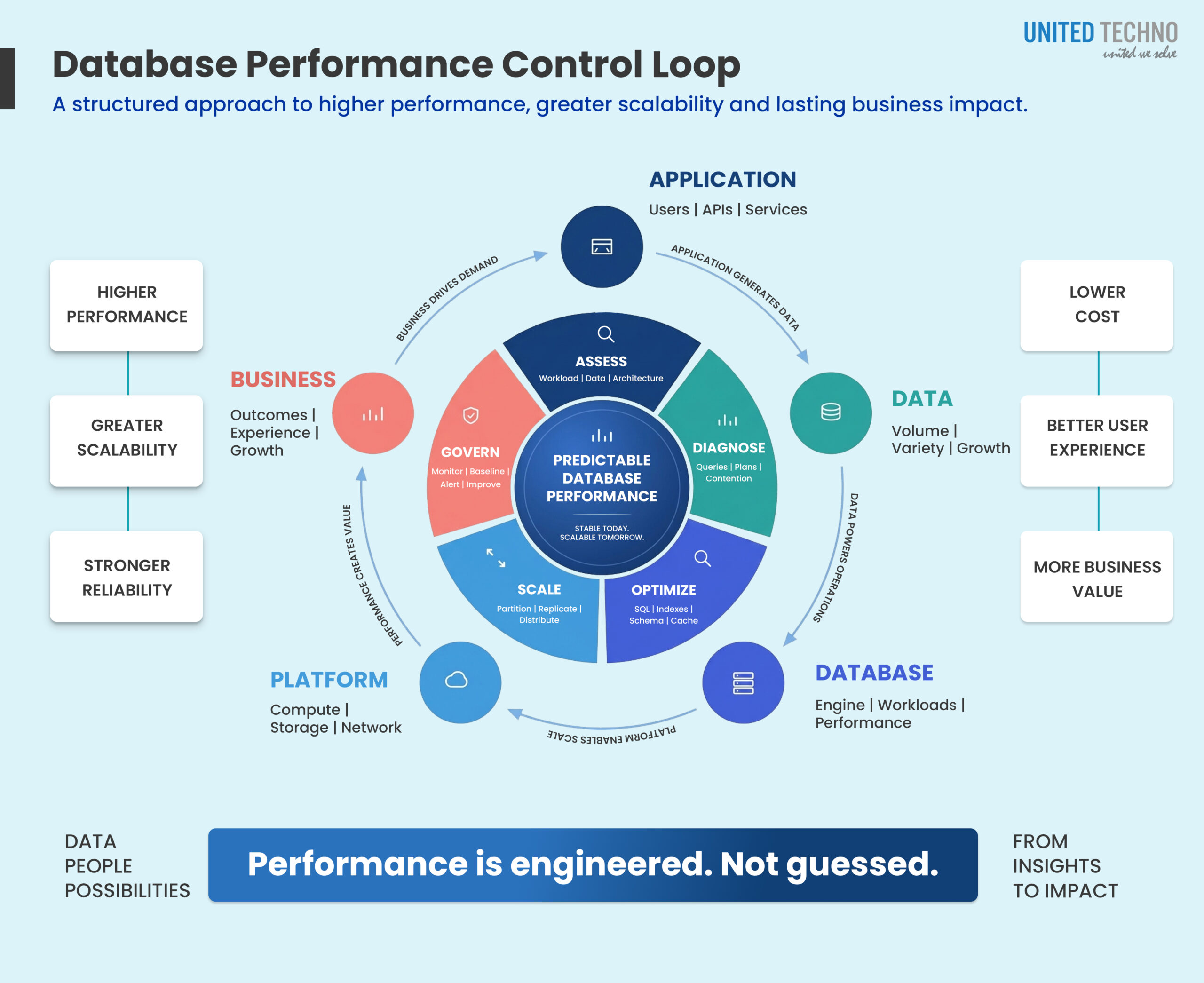
United Techno Database Performance Framework
At United Techno, we approach database performance as a business-critical engineering discipline.
Our approach combines:
Database Architecture
Understand whether the existing design fits the workload.
SQL Engineering
Identify inefficient access patterns and expensive execution behavior.
Physical Design
Review indexes, partitions, schemas and storage strategies.
Application Alignment
Identify unnecessary database calls and inefficient transaction behavior.
Scalability Engineering
Prepare the platform for higher volume and concurrency.
Performance Governance
Establish baselines, monitoring and continuous improvement.
The objective is not to make one query impressive.
It is to create a database environment that remains responsive, scalable and predictable as the business grows.
The Real Goal of Database Optimization
A database is not optimized because a query runs faster today.
It is optimized when the architecture can absorb:
more data
more users
more transactions
more integrations
more analytical demand
without turning every growth event into a production incident.
That requires more than SQL tuning.
It requires understanding the relationship between workload, data, application behavior, database architecture and infrastructure.
And that is where database performance tuning becomes an architecture discipline rather than a troubleshooting exercise.
Improve Database Performance Without Guesswork
United Techno helps enterprises identify the real causes of database performance problems, from inefficient SQL and indexing to workload contention, data growth, architecture limitations and scalability constraints.
Our database architects can assess your current environment, establish a measurable performance baseline, identify the dominant bottlenecks, and build a practical optimization roadmap across SQL Server, Oracle, PostgreSQL, MySQL and cloud database environments.
If your database is becoming the bottleneck, start with the workload, not the hardware.
Talk to United Techno about a Database Performance Assessment →